
The competitive gaming keyboard market has evolved dramatically over the past few years, with magnetic Hall Effect switches emerging as the new gold standard for performance-oriented peripherals.
At the forefront of this revolution stands Wooting, a Dutch company that has consistently pushed the boundaries of what gaming keyboards can do.
Their latest release, the Wooting 60HE v2, takes everything that made the original 60HE a standout product and refines it further, cementing its position as one of the premier choices for serious gamers.
Building on a Strong Foundation
The original Wooting 60HE earned widespread acclaim for introducing magnetic Hall Effect switches to the mainstream gaming keyboard market in an accessible, feature-rich package.
It offered analog input, adjustable actuation points, and rapid trigger technology that gave competitive players genuine advantages in fast-paced games. The 60HE became particularly popular among FPS players and rhythm game enthusiasts who could leverage its unique capabilities to enhance their performance.
With the v2 iteration, Wooting hasn’t attempted to reinvent the wheel. Instead, they’ve taken a measured approach, addressing user feedback and refining the areas where the original model had room for improvement. This philosophy of iterative enhancement rather than radical redesign demonstrates a mature understanding of their product and market.
What’s New in the v2
The improvements in the Wooting 60HE v2 might seem subtle on paper, but they represent meaningful upgrades that enhance the overall user experience.
The most significant changes include improved stabilizers, a refined case design, enhanced acoustic properties, and upgraded internal components that promise better longevity and consistency.
The stabilizer upgrade deserves particular attention. The original 60HE featured decent stabilizers, but they weren’t quite on par with what enthusiasts expected from a premium keyboard. The v2 addresses this with factory-lubricated stabilizers that significantly reduce rattle and provide a smoother, more consistent feel across larger keys like the spacebar, shift, and enter keys.
This improvement brings the typing experience closer to what custom keyboard enthusiasts achieve with their meticulously tuned builds.
Wooting has also refined the case design with subtle modifications that improve both acoustics and structural rigidity. The bottom of the case now features improved foam layering that dampens sound more effectively, resulting in a deeper, more satisfying acoustic profile.
The keyboard sounds less hollow and more premium, which matters more than many might initially think—after all, you’ll be hearing this keyboard for thousands of hours if it becomes your daily driver.
Similar competitive gaming keyboards on Amazon ->
The Hall Effect Advantage
For those unfamiliar with Hall Effect technology, it’s worth understanding why this switch type has become so popular among competitive gamers.
Unlike traditional mechanical switches that rely on physical contact to register keypresses, Hall Effect switches use magnetic fields to detect key position. This contactless design offers several significant advantages.
First, there’s effectively zero switch degradation over time. Traditional mechanical switches can develop issues after millions of keypresses as their contact points wear down. Hall Effect switches, by contrast, have no physical contact points to wear out, meaning they should maintain their performance characteristics indefinitely.
Second, and perhaps most importantly for gamers, Hall Effect switches enable true analog input and per-key adjustable actuation points.
You can set your WASD keys to actuate at 0.1mm for lightning-fast response times while keeping your other keys at more standard actuation points to prevent accidental presses. This level of customization was simply impossible with traditional mechanical switches.
The Wooting 60HE v2 takes full advantage of these capabilities through its robust software suite, which has been continuously refined since the original model’s launch.
Software and Customization
Wootility, Wooting’s configuration software, is where the 60HE v2 truly shines. The interface is intuitive yet powerful, offering an impressive depth of customization without overwhelming users.
You can adjust actuation points for individual keys down to 0.1mm increments, ranging from 0.1mm to 4.0mm. This granular control allows for incredibly precise optimization based on your specific needs and preferences.
Rapid Trigger mode, one of Wooting’s signature features, remains a game-changer for competitive play. This mode eliminates the traditional hysteresis of mechanical switches, registering key release and re-actuation almost instantaneously.
In practical terms, this means you can change directions or perform rapid sequential inputs faster than with any traditional keyboard. The advantage in games like Counter-Strike, Valorant, or Apex Legends is tangible and immediately noticeable.
The software also supports advanced features like analog input mapping, which allows you to use keyboard keys like analog sticks.
While this feature hasn’t gained mainstream adoption, it opens interesting possibilities for certain game genres and can be particularly useful in racing games or flight simulators if you don’t have dedicated controllers.
Profile management is another strength of Wootility. You can create different configurations for different games or applications and have them automatically switch based on what you’re running. This seamless transition between optimized setups enhances the overall user experience significantly.
Similar low budget gaming keyboards on Amazon ->
Build Quality and Design
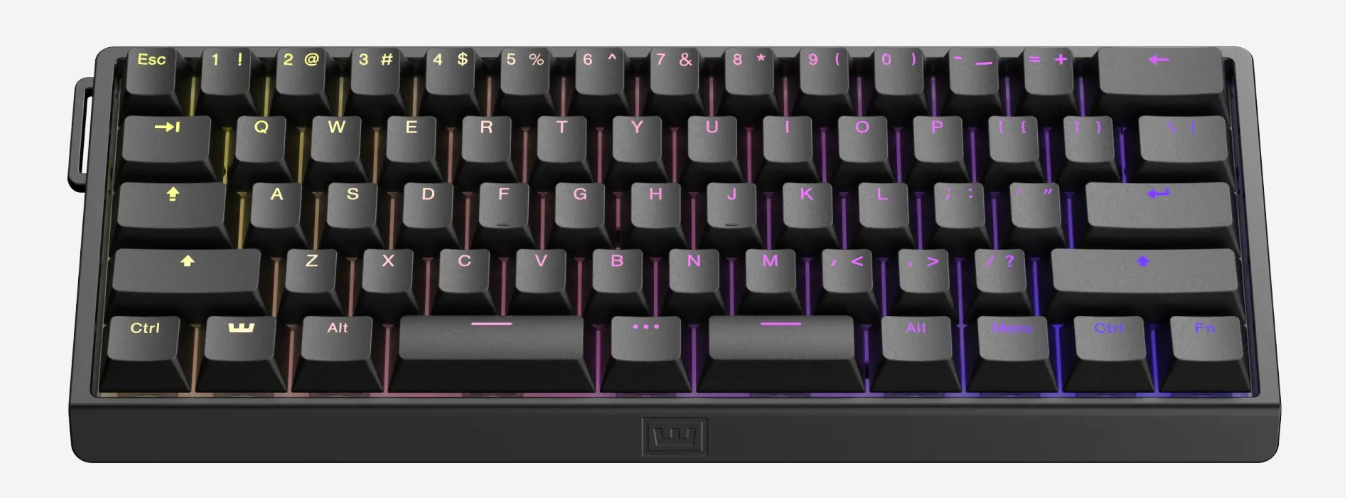
The Wooting 60HE v2 maintains the 60% form factor of its predecessor, which means it lacks dedicated arrow keys, function row, and navigation cluster.
This compact layout maximizes desk space and is ideal for gaming setups where mouse room is at a premium. However, it does require some adjustment if you’re coming from a full-size or tenkeyless keyboard, particularly for tasks that heavily rely on those missing keys.
The build quality is excellent throughout. The aluminum case feels substantial without being excessively heavy, providing the right balance between portability and desk presence. The keyboard doesn’t flex or creak under normal use, and the overall construction inspires confidence in its durability.
The keycaps are doubleshot PBT, which is the right choice for a premium gaming keyboard. They’re durable, resistant to shine, and have a pleasant texture that’s neither too smooth nor too rough. The legends are crisp and clear, with good font choices that maintain readability without looking overly “gamery.”
While they’re not the highest quality PBT keycaps available in the custom keyboard market, they’re more than adequate for most users and significantly better than the ABS caps found on many competing gaming keyboards.
Cable management is handled via a USB-C connection with the port positioned on the rear of the keyboard. The included cable is detachable, braided, and of good quality, though keyboard enthusiasts will appreciate the option to use their own custom cables.
Typing Experience
While the Wooting 60HE v2 is primarily marketed toward gamers, its typing experience deserves attention. The Lekker switches used in the keyboard have a linear feel with smooth travel throughout their range. They’re relatively quiet compared to clicky switches but aren’t silent—you’ll definitely hear them in a quiet room, though they’re unlikely to disturb others in most environments.
The improved stabilizers make a noticeable difference in the typing experience. Large keys feel considerably smoother and more consistent than on the original 60HE, which enhances the overall typing rhythm. There’s minimal rattle or ping, which were occasional complaints about the first version.
The ability to adjust actuation points proves useful for typing as well, not just gaming. Some users prefer lighter, faster actuation for typing, while others like a longer travel distance to reduce typos. The 60HE v2 accommodates both preferences and everything in between.
Gaming Performance
This is where the Wooting 60HE v2 truly excels. The combination of Hall Effect switches, adjustable actuation points, and Rapid Trigger mode creates a responsiveness that traditional keyboards simply cannot match. In fast-paced competitive games, the difference is immediately apparent.
Counter-strafing in tactical shooters feels more precise and consistent. You can peek corners and change directions with a level of control that gives you fractions of a second advantage—small margins that can determine round outcomes at higher levels of play. The reduced input lag and elimination of debouncing delays compound to create an exceptionally responsive feel.
In rhythm games like osu! or similar titles, the adjustable actuation and rapid response times allow for faster streaming and more consistent timing. Players who compete in these genres have gravitated toward Wooting keyboards specifically because of these performance characteristics.
The keyboard maintains consistent performance even during marathon gaming sessions. There’s no perceptible degradation in responsiveness or increase in error rates during extended use, and the switches remain cool and comfortable even after hours of gameplay.
You can also visit our Digital Nomad Shop for more options ->
RGB and Aesthetics
The RGB lighting on the Wooting 60HE v2 is bright, even, and highly customizable. The per-key RGB allows for intricate lighting effects and patterns, all configurable through Wootility. The lighting is visible both through the keycaps and along the keyboard’s edges, creating a pleasant underglow effect.
While RGB might be dismissed as purely aesthetic, it actually serves a functional purpose on the 60HE v2. You can use lighting to indicate different actuation zones, active profiles, or key functions in different layers. This visual feedback can be genuinely useful, especially when learning new layer layouts or troubleshooting configuration issues.
The aesthetic design is clean and relatively understated for a gaming keyboard. There are no aggressive angles, unnecessary cutouts, or prominent branding. It looks professional enough for an office environment while maintaining enough personality to satisfy gamers who want their setup to reflect their interests.
Comparison to Competitors
The gaming keyboard market has become increasingly competitive, with several manufacturers now offering Hall Effect keyboards. Competitors include the DrunkDeer A75, Keychron Q1 HE, and various models from companies like Razer and SteelSeries that have begun incorporating similar technology.
What sets the Wooting 60HE v2 apart is the maturity of its software ecosystem and the company’s commitment to continuous improvement. Wootility receives regular updates that add features and refine existing functionality. Wooting’s customer support and community engagement are also notably strong, with the company actively listening to feedback and implementing requested features.
The pricing is competitive, falling in the premium category without being exorbitant. You’re paying for genuine innovation and excellent execution rather than just brand name or flashy marketing.
Areas for Consideration
While the Wooting 60HE v2 is an excellent keyboard, it’s not perfect for everyone. The 60% layout is a significant limitation if you frequently use the missing keys. There’s a learning curve to effectively using layers for functions typically handled by dedicated keys, and some users never fully adapt to this workflow.
The keyboard also lacks wireless connectivity, which is increasingly common even in gaming-focused keyboards. While the wired connection ensures zero latency and eliminates battery concerns, the lack of wireless flexibility might disappoint users who value cable-free setups.
The software, while powerful, can be slightly overwhelming for users new to this level of customization. There’s a lot to learn, and finding optimal settings requires experimentation and time investment. However, the default settings work well enough that you can use the keyboard effectively without diving deep into customization if you prefer.
The Verdict
The Wooting 60HE v2 represents a thoughtful evolution of an already excellent product. It takes the innovative foundation of the original 60HE and refines it with meaningful improvements that address previous shortcomings while maintaining everything that made the original special.
For competitive gamers seeking every possible advantage, the combination of Hall Effect switches, Rapid Trigger mode, and adjustable actuation makes this keyboard genuinely superior to traditional options. The performance benefits aren’t placebo—they’re measurable and noticeable in actual gameplay.
The improvements in the v2, particularly the upgraded stabilizers and enhanced acoustics, make it a more well-rounded product that better serves as a daily driver for both gaming and productivity tasks. The build quality and attention to detail throughout justify the premium pricing.
Is it the best gaming keyboard on the market? That depends on your specific needs and preferences, but it’s undeniably among the top contenders. If you value performance, customization, and innovation, and you can adapt to the 60% layout, the Wooting 60HE v2 deserves serious consideration.
It’s a solid upgrade that maintains Wooting’s position at the forefront of gaming keyboard innovation while delivering tangible improvements that existing 60HE owners and newcomers alike will appreciate.
The competitive gaming keyboard market continues to evolve, but Wooting has proven they can iterate intelligently on their successful formula. The 60HE v2 isn’t a revolutionary product—it doesn’t need to be. It’s a refined, enhanced version of what was already one of the best gaming keyboards available, and sometimes that’s exactly what the market needs.
You can also visit our Digital Nomad Shop for more options ->